Samsung discontinuing its texting app, tells users to switch to Google Messages
Source: ABC News/AP
April 6, 2026, 10:59 AM
NEW YORK -- Samsung is saying goodbye its namesake texting app.
According to an end of service announcement published on the tech giant's U.S. support website, Samsung Messages will be discontinued in July. Impacted owners of Samsung smartphones and other gadgets are being asked to switch to Google Messages in the meantime, “to maintain a consistent messaging experience on Android.”
All Samsung Galaxy phones run on Google's Android operating system. To switch to Google Messages, Samsung's website gives users instructions to download the app from the Play Store, if not already on their phone, and set it as the default. Some people may also receive an in-app notification to guide them through the process.
Samsung says switching to Google Messages will give users access to updates like the latest artificial intelligence features from Google's Gemini — which includes an experimental feature called “Remix” to generate images during conversations and AI-powered reply suggestions — and the ability to share higher quality photos between Android and Apple iOS devices through RCS-enabled messages.
Read more: https://abcnews.com/Technology/wireStory/samsung-discontinuing-texting-app-tells-impacted-users-switch-131766567
I have one of Samsung's "Z Fold" phones and just opened it up and it had done a software update and trying "Messages" displayed their warning screen about it being discontinued and giving the option to switch to Google Messages (the screen also said it would transfer any messages over to that app once selecting to go with the other message app). Will try to make sure to disable any AI shit that it has settings that can be changed once I go ahead.
 = new reply since forum marked as read
Highlight:
NoneDon't highlight anything
5 newestHighlight 5 most recent replies
= new reply since forum marked as read
Highlight:
NoneDon't highlight anything
5 newestHighlight 5 most recent replies

hlthe2b
(114,032 posts)but the level of backlash for Apple if they tried to do this would be seismic.

C Moon
(13,653 posts)She has installed a couple of apps that take over the phone with ads and installed about 20 new apps. I knew nothing about Samsung, but finally figured out how to get it back to its original state. I hate that phone.

BumRushDaShow
(170,015 posts)Got it last fall to replace my old iPhone 12 Pro. 
But Apple may do something with Siri equivalent to this eventually (I don't use Siri though).

bucolic_frolic
(55,240 posts)text messages. What are we supposed to do about saved TXT's? How is the transition being made? That's the only thing that works well on my phone. SamDung browser sucks big time, but it's smaller than Chrome.

AZJonnie
(3,716 posts)Then you set google messages as the default messaging app in your phone. That's the transition. All old texts are still there, it's just a more feature-rich interface (shows you indicator that the other user is typing, for instance, which Samsung messenger does not).
Also FYI for all, there's one "AI" feature that may "phone home", and that is the "Magic Compose" feature. IOW when you use this feature to write for you, it may reach out to the cloud (by default) and send it up to 20 of your recent messages in order to "compose" your message for you (personally have never used, don't imagine I will, ever).
Important Caveats: When I say it "may", here's what that means:
1) If you have an S23 or older Samsung, Magic Compose will always send messages to cloud *IF* you use the Magic Compose feature. The processor itself lacks AICore, so no ability to process your texts locally.
2) If you have an S24, Magic Compose *may* be setup currently to send messages to cloud *IF* you use the Magic Compose feature, BUT you have an option to set it to send your recent texts to Gemini Nano (which is a purely local AI engine i.e. nothing is sent to the cloud for processing, it's done on your phone itself), you just may have to tweak a setting to enable Nano instead. Apparently some S24's handset will default differently from others, probably based on when the phone was made (later ones will already be set to Gemini Nano).
3) If you have an S25 or S26, Gemini Nano is the DEFAULT AI engine for Messenger, so you don't have to do anything to keep your texts 100% local even if you use Magic Compose.
bucolic_frolic
(55,240 posts)Do you want to use Messages as your default app instead of Messages?
Afraid to remove from Home Screen. Last time I did that it took 45 minutes to find it again

2naSalit
(102,931 posts)I refuse to add any fucking ggooglie on my phone, fuck that shit. They just want to be able to eavesdrop on your conversations and filter out those of us who say certain things.
Not participating.


ForgoTheConsequence
(5,191 posts)2naSalit
(102,931 posts)
Polybius
(21,918 posts)I sure do miss her. 
bucolic_frolic
(55,240 posts)Could probably charge $10 a secure message. No fuel, the birds do all the work.
ToxMarz
(2,947 posts)Google Messages pushed the carrier adoption of RCS over their sub par proprietary messaging that locked users to their service.
Breif history:
Google did not "force" RCS (Rich Communication Services) on carriers in a legal or regulatory sense, but they did use a "bypass" strategy to effectively make carrier refusal irrelevant for Android users.
Initially, Google waited for carriers to adopt the RCS Universal Profile, but when adoption stalled, they took several aggressive steps to ensure the service reached users:
1. The "Google Guest" Bypass
In 2019, after years of carrier delays, Google began rolling out RCS directly to users via the Google Messages app. If a carrier didn't support RCS, Google provided the backend infrastructure (through its Jibe platform) themselves, bypassing the carrier's network for the rich features. This meant users could get "Chat features" (typing indicators, high-res photos) as long as they used Google's app, regardless of their carrier's stance.
2. Strategic Partnerships
Instead of forcing carriers, Google made it easier for them to "join" rather than "build." Major US carriers like T-Mobile, AT&T, and Verizon eventually scrapped their own failed RCS projects and partnered with Google to use Jibe as their official backend.
3. Making Google Messages the Default
Google worked with manufacturers like Samsung to make Google Messages the default messaging app on new devices. This centralized the user base, making it less profitable for carriers to maintain separate, incompatible messaging standards.
Current Status: Handing Control Back
As of late 2025 and 2026, reports indicate Google has started removing the "Google Guest" bypass in many regions. Because most major carriers now officially support RCS (partly to ensure compatibility with Apple's recent adoption of the standard), Google is handing the responsibility for RCS back to the carriers. This has caused issues for some users on smaller carriers that never officially signed on.

Mr.Bee
(1,835 posts)If you're getting a text or texting,
you are already using Google Messages.
Look at the top of your screen.
You don't have to do anything else,
unless you want the bloatware!

Omaha Steve
(109,309 posts)

Arrgh
(27 posts)I had three that were pretty good, decent cloud storage and/or local to micro sd, good iOS app. A few years ago they pulled all support, no way to use them at all. No advance announcements, no alternatives. No response to customer complaints.
To be fair, no company will support legacy hardware/software in perpetuity, but to yank it all at once is bad PR at least. I will never buy Samsung again.

Deminpenn
(17,523 posts)a couple year ago in favor of Google messages and it's been fine. They have an AI thingy called Gemini, but you don't have to use it.

Intractable
(2,159 posts)that enable texting from the computer.
It's easy for me to use cut and paste, or do things like attach and save images to and from texts.
It synchs with the phone.
Polybius
(21,918 posts)I use it all the time, and even found it worked better before I switched to Google Messages.

LeftInTX
(34,359 posts)Watch out...
Go directly to Google's website.
I just found out the hard way!
I ended up downloading two of them!
They were spammy.
Then I went to Google's website, where they link to the download. (The download still is on Google Play, but they link to the correct one)
Now I have to delete those other two messaging apps...grrh...
Mr.Bee
(1,835 posts)comes with Google Messages already installed.
LeftInTX
(34,359 posts)app
Mr.Bee
(1,835 posts)and only works reception-wise if I'm holding it!
I had to do a factory reset to get rid of all the bloatware.
and just tell notifications to GO AWAY!
I only need a phone
I only need texting
I only need internet
nothing more!
Quanto Magnus
(1,352 posts)due to their bloatware.....
Why did they have to add a whole other layer of apps that were already native to the OS? Data collection advantage is my guess.
Mr.Bee
(1,835 posts)I'm retired techie.
So I only need internet access tether to my computer.
I don't use the phone or voicemail, and tell anyone sent a text.
That's it. I don't need any of this other stuff loaded in the OS.
How do I know that it's in the OS?
Because I did a factory reset and saw everything that loads with the OS.
My first mistake was thing I had to install the updates, which brings back tons of bloatware!
Second factory reset.
destroy all notifications (turn off)
don't worry, everything comes back if you restart.
So don't fall for the updates. Don't reinstall them.
swipe down on the left side of screen
and turn off all notifications.
Polybius
(21,918 posts)I have the Z Fold 5. I used to love Samsung Messages, but switched to Google about a year ago.
BumRushDaShow
(170,015 posts)Meanwhile, I have had parallel iPhones to the above - from the iPhone 4S to the iPhone 6+ to the iPhone 12 Pro to my current iPhone 17 Pro.
(had some older flips including one of the early Samsungs with a black and white LCD screen then a Motorola ic902 (after Sprint had merged with Nextel and I wanted the "walkie talkie" feature) -
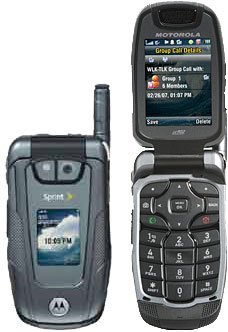
I could side-load stuff on that and it ran Opera great as a browser! My old eyes can't read that tiny screen anymore but still...